
Add SmartMe as a preferred source.
The Smart Meter Home Area Network
Functionality
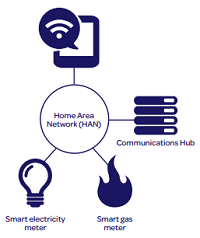
The Home Area Network or HAN is similar to your home broadband wireless network and is used to communicate between the meters, the In Home Display (IHD) and other items of equipment.
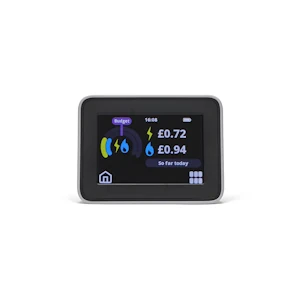
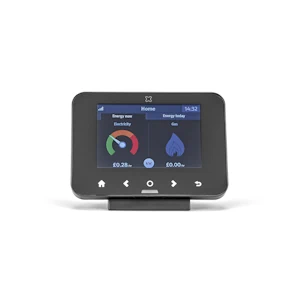
The IHD is a small standalone display, which you might typically keep in your kitchen, which shows your current energy consumption for both electricity and gas. It shows that as kWh (kilowatt hours, the unit used to measure energy usage) and in pounds and pence. It also shows your energy usage over various time periods, the current day, week, month and year.
Electricity values are updated every 10 seconds and gas every 30 minutes.
The costs shown on the IHD include the daily standing charges. The standing charge for electricity is added just after midnight and gas seems to be added later in the day.
Note that the IHD uses a simplified gas calculation and so could be about 1p a day out for the average customer.
The costs shown on the IHD may or may not include VAT depending on your supplier.
If you need a guide to using and understanding your IHD, have a look on our documents page to see if we have a User Guide for your particular supplier and IHD. Just type your supplier's name in the search box to see the different guides available.
TIP: If the standing charges or rates do not look correct, ask your supplier to send the SMETS command "Update Tariff Configuration" - this should sort it out.
IHDs have a minimum set of features which are specified in the Smart Metering Equipment Technical Specifications (SMETS).
Normally the Communications Hub that manages the HAN sits on top of your electricity meter and communicates with the electricity meter, gas meter and IHD.
The communication protocol used for the Smart Meter HAN is Zigbee as it is simple, inexpensive, low power and secure. The range of this technology is about 15m, but this is reduced by obstructions such as walls and doors.
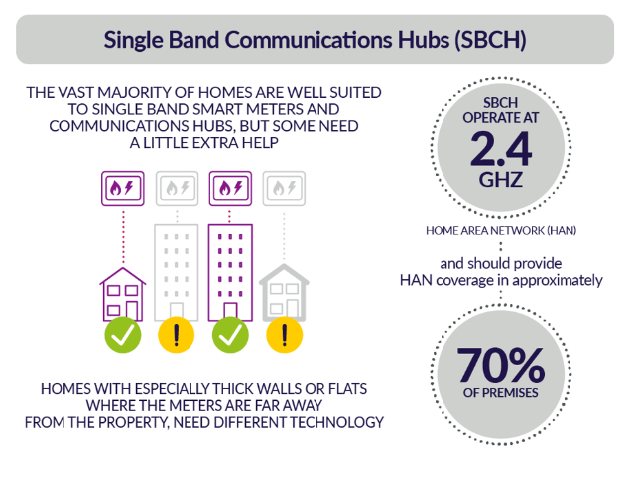
Where the meter is a long way from the location of the IHD, or thick walls are in the way, the current technology (Zigbee at 2.4GHz) won't work. This could be the case for up to 30% of properties.
A different communications method (Zigbee 2.4 GHz & 868MHz or Dual Band HAN) available from mid 2020 will improve this for about 26.5% of properties but that still leaves a large number for whom Smart Meters won't work.
For these final properties, for example where meters are in a basement a long way from the customer's IHD, a separate company has been set up to investigate solutions, prepare contracts and procure the equipment. The company is the Alt HAN Co Ltd. They have paired with Landis & Gyr (L+G) as their preferred technology partner and tested Alt HAN devices in January 2023. The first delivery of the solution for mass rollout is expected in July 2023.
HAN Solutions
- Standard HAN 2.4GHz
- 70% of premises.
- Normal small and medium houses.
- Nominal range of 15m.
- SMETS 1 and SMETS 2.
- Dual Band HAN 2.4GHz & 868MHz
- 26.5% of premises.
- Large houses and buildings, thick walls.
- Signal can travel further but is lower bandwidth and therefore slower.
- As name Dual Band implies it includes both 2.4GHz and 868MHz transceivers.
- Tested in August & September 2020, mass roll-out started January 2021.
- More expensive than Standard, additional £24.20 per meter set.
- SMETS 2 only
- Alternative HAN solutions
- Between 2% and 3.5% of premises.
- Long distance between meters and IHD, for flats with meters in a basement.
- Most expensive solution.
- New company Alt HAN Co Ltd formed to manage this
- Solution being delivered:
- Other solutions considered:
- Leaky Feeder Aerials.
- Larger aerial inside comms hub.
- Procurement started in September 2022.
- Testing started in January 2023.
- First delivery of the solution for mass rollout in July 202.3
- Estimated Total additional cost £290M.
- SMETS 2 only.
- No solution (too costly)
- Between 1.5% and 3% of premises.
- Extreme distances.
- Faraday cage buildings.
HAN Frequencies
SMETS 2 Communication Hubs provide the HAN functionality to connect to the gas meter and the IHD. The HAN uses the 868 MHz and 2400 MHz frequency bands.
| Frequency Band MHz | CHAS | Type | CSP Area |
|---|---|---|---|
| 868 (863-876) | EDMI DBCH, WNC DBCH, TOSH DBCH |
HAN | All Areas |
| 2400 (2402.5-2482.5) | All CHAS Units | HAN | All Areas |
CHAS = Communication Hub Antenna Structure,
CSP = Communications Service Provider,
DBCH = Dual Band Comms Hub,
SBCH = Single Band Comms Hub.
Single Band HAN 2.4GHz
Single Band Communication Hubs operating at 2.4GHz are used on both SMETS 1 and SMETS 2 meters, providing sufficient coverage in approximately 70% of premises. Coverage fails where there is a long distance between the Comms Hub and the Gas Mater and IHD, and where the walls are thick.
Dual Band HAN 2.4GHz & 868MHz
Dual Band Communication Hubs operating at 2.4GHz and 868MHz are used on SMETS 2 meters and can increase coverage in premises by approximately 26.5% to 96.5%. This is possible because radio waves with a lower frequency or longer wavelength naturally travel further. Higher frequency radio waves are more easily absorbed by objects in their path.
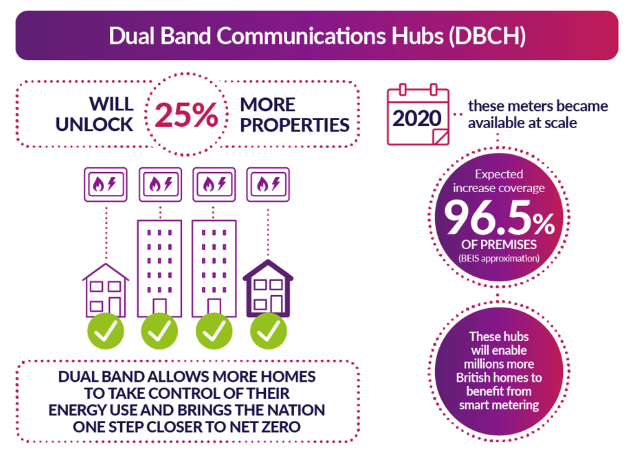
The addition of the Dual Band Comms Hub still leaves 3.5% of premises requiring coverage; these will be the target of the Alt HAN Co Ltd.
The project to design and introduce Dual Band Comms Hubs was managed by the Data Communications Company (DCC).
Alt HAN Devices
Having considered a number of options the Alt HAN company have developed solutions for customers with a large distance between their electricity meter and IHD or Gas Meter where standard Zigbee coverage is insufficient. The solutions are known as the Alt HAN devices and are based on power line communication principles. Landis+Gyr are building the devices and around 2.5% of homes are expected to use them. They are now being installed by suppliers.
The Alt HAN solutions work by extending Zigbee connectivity between SMETS devices using a combination of broadband powerline communication (PLC) bridges and long-range radio connections.
Alt HAN devices must not be installed in multi-way extension sockets or connected to devices designed to filter Radio Frequency Interference (RFI) or suppress mains surges. Doing so may interfere with their performance and connectivity, potentially disrupting the communication between HAN devices and the Communications Hub. For optimal operation, Alt HAN devices should be plugged directly into a standard mains socket without any intermediary filters or surge suppressors.
There are four Alt HAN devices, called Bridges:
- Bridge 1 is installed alongside the electric meter and draws its power directly from the electric meter itself. It connects the HAN and power line communications (PLC).
- Bridge 2 is a plug-in device powered by connecting to any standard electrical socket within the premises. It connects the HAN and power line communications.
- Bridge 3 is another plug-in device that also uses a standard socket for power. It connects the HAN, Long Range Radio (LRR) and power line communications.
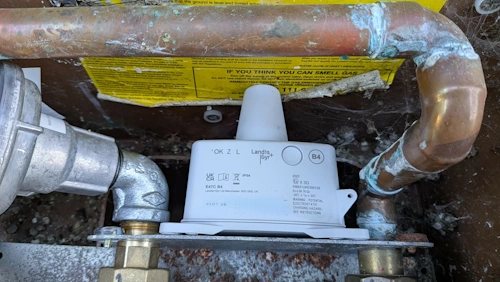
- Bridge 4 is battery-powered and is mounted on the gas meter using a bracket. It is designed to synchronise its wake-ups so that it has established a link to the Communications Hub just before the Gas Meter's thirty-minute wake-up ready for the Gas Meter communications. It connects using Long Range Radio.
Each Bridge is designed for specific installation scenarios to extend connectivity between smart metering devices. Alt HAN connects to and extends the 2.4GHz Zigbee HAN using Power Line Communications (PLC), it is not designed to connect to the 868MHz HAN provided by Dual Band Comms Hubs, although Dual Band Hubs operating on both frequencies can still be used.
The device needs to remain on all the time for the comms hub and devices to communicate, however you can turn it off if you need to and move it to a more convenient position provided it's still near the IHD or gas meter.
You cannot buy these devices. They will be supplied by your supplier free of charge where required.
When you move house you should leave the Alt HAN device(s) and your IHD behind as they will only work with the installed comms hub.
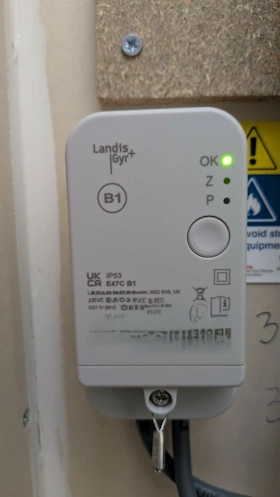
Alt HAN Bridge 1
Bridge 1 is installed alongside the electric meter and draws its power directly from the electric meter itself. It connects the HAN and power line communications (PLC).
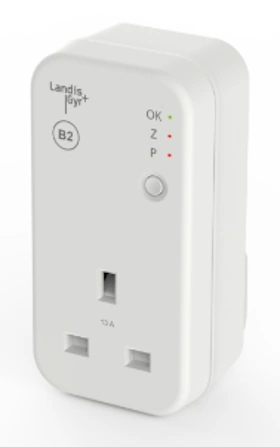
Alt HAN Bridge 2
Bridge 2 is a plug-in device powered by connecting to any standard electrical socket within the premises. It connects the HAN and power line communications.
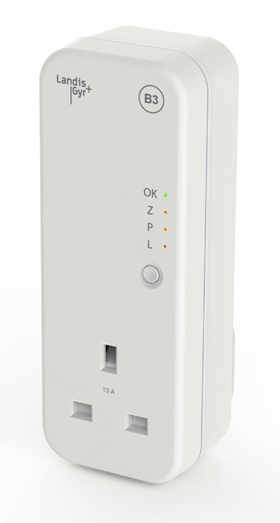
Alt HAN Bridge 3
Bridge 3 is another plug-in device that also uses a standard socket for power. It connects the HAN, Long Range Radio (LRR) and power line communications.
Alt HAN Bridge 4
Bridge 4 is battery-powered and is mounted on the gas meter using a bracket. It is designed to synchronise its wake-ups so that it has established a link to the Communications Hub just before the Gas Meter's thirty-minute wake-up ready for the Gas Meter communications. It connects using Long Range Radio.
Interference with Wi‑Fi
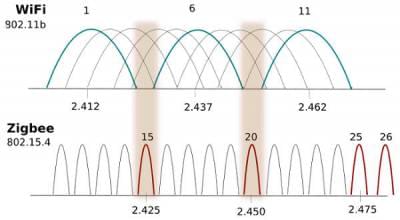
The operation of the HAN should not interfere with your Wi‑Fi despite operating in the same 2.4GHz band. Many appliances operate in this unlicensed band and are designed to choose a channel with less traffic and then share that channel with the other users. There could be some interference at the beginning as devices choose the best channel, but this is unlikely.
Fortunately, the Zigbee specification has a couple of extra channels above the UK 11 Wi‑Fi channels, so in normal operation the Comms Hub will choose a channel between the Wi‑Fi bands or above them.
If you do have problems, try:
- Moving your Wi‑Fi router away from the Comms Hub and IHD
- If your router has a 5GHz option, use that for your devices (faster but shorter range)
- Log into your Wi‑Fi Router and choose channels 1, 6 or 11 on the 2.4GHz band. Leave your Wi‑Fi router switched on all the time so that the Comms Hub can choose the channel with least interference.
For comparison with the Smart Meter frequencies shown earlier on this page, here are the main Wi‑Fi frequencies.
| Frequency Band (GHz) | Description |
|---|---|
| 2.4 | This band is the most widely used of the bands available for Wi‑Fi, being used for 802.11b, g, & n. It can carry a maximum of three non-overlapping channels. This band is widely used by many other non-licensed items including the Smart Meter HAN, microwave ovens, Bluetooth, etc. |
| 5.8 | This band provides additional bandwidth and is used by 802.11a & n. It can carry up to 23 non-overlapping channels but gives a shorter range than 2.4 GHz. 5GHz Wi‑Fi is preferred by many because of the number of channels and the bandwidth available. There is also less traffic on this band currently, resulting in less interference. |