
Add SmartMe as a preferred source.
SMETS Meter Communication Hubs
SMETS 2 Comms Hubs


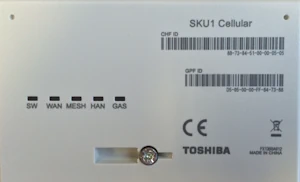
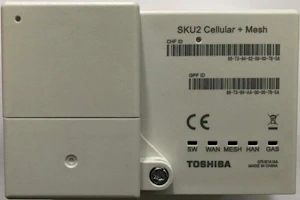
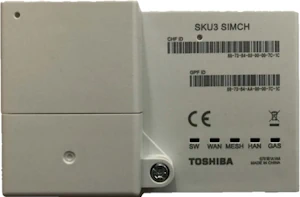

The communications hub fits on top of the electricity meter and is owned by the DCC, unlike the meter which is owned either by your supplier or a MAP (Meter Asset Provider) to whom your supplier pays a rental charge. The interface connection to the meter is called the Intimate Communications Hub Interface (ICHI). The comms hub provides both the WAN and the Home Area Network (HAN). The Wide Area Network talks to the DCC and the Home Area Network talks to the gas meter and the IHD.

Comms Hub Variants
Different comms hubs are used in different regions, see the table below.
| CSP Region | WAN Variant | Manufacturer | Comms WAN Technology | External Aerial Port |
|---|---|---|---|---|
| North (Arqiva Limited) |
Standard 420 | EDMI | Long Range Radio | No |
| Variant 450 | ||||
| Central & South (Telefónica) and North (Arqiva Limited) |
SKU1 Cellular | WNC (Wistron NeWeb Corp.) & Toshiba | Cellular | |
| SKU2 Cellular + Mesh | Toshiba | Cellular & Mesh | 1 Cellular | |
| SKU3 SIMCH | Cellular & Mesh | 1 Cellular 1 Mesh |
SKU = Stock Keeping Unit
SIMCH = Special Installation Mesh Communications Hub.
You can see on the table above that the Toshiba comms hub using the mobile network can take one or two aerials. The SKU2 and SKU3 comms hubs have an additional cover on the left over the aerial connectors.
A new type of comms hub has been developed called the Virtual WAN Communications Hub (VWCH) to connect to DCC through broadband if available.
Comms Hub Aerials
Surveys have determined in advance what equipment and aerials should be used for an installation.

If the mobile network Communications Hub does not connect to the WAN successfully with the recommended equipment the installer will work through the following equipment combinations:
- SKU1 comms hub
- SKU2 comms hub and T1 aerial
- SKU2 comms hub and T2 aerial
If it still doesn't work, the installer will leave the SKU2 comms hub with the T2 aerial installed and report to DCC that additional WAN work is needed. This is known as "Install and Leave" in the industry.


T1 and T2 aerials are for internal use only. Typically, the smaller T1 aerial will be used to get around obstacles, and the T2 for signal strength issues.

T3 aerials are for external use where there are signal strength issues.
The table below shows details for each of type of aerial.
| Aerial Type | % Installs | Radio Use | Manufacturer | Dimensions (mm) | On which Hubs |
|---|---|---|---|---|---|
| T1 Low Gain |
6% | Cellular | Panorama | 165 x 32 x 20 | Toshiba SKU2 (and SKU3 if poor signal) |
| WNC | 128 x 25 x 17 | ||||
| T2 High Gain |
4% | Panorama | 372 x 33 x 20 | ||
| WNC | 320 x 41 x 17 | ||||
| T3 High Gain |
0.5% | Panorama | 695 x 25 x 25 | Toshiba SKU2/3 | |
| Oriel | 580 x 100 x 40 | ||||
| M1 Low Gain |
0.25% | Mesh | TBA | TBA | Toshiba SKU3 |
| M2 High Gain |
0.25% | TBA | TBA | ||
| No aerial | 89% |
WAN Frequencies
The tables below show the different frequency bands used by Smart Meter Comms Hubs.
| Frequency Band MHz | CHAS | Type | CSP Area |
|---|---|---|---|
| 423 (422-424) | EDMI SBCH, EDMI DBCH |
WAN (includes 'buddy mode') | North excluding Fylingdales |
| 454 (453-455) | EDMI DBCH, EDMI Fyl DBCH |
WAN (includes 'buddy mode') | North at Fylingdales |
| 800 (801-811) | TOSHIBA (4G CELLULAR DB) | WAN | All Areas |
| 869 (869-870) | WNC DBCH, TOSH DBCH (SKU7) |
WAN MESH | All Areas |
| 900 (925-960) | WNC DBCH, TOSH DBCH (SKU7) |
WAN | All Areas |
| 2100 (2110-2170) | WNC DBCH, TOSH DBCH (SKU7) |
WAN | All Areas |
CHAS = Communication Hub Antenna Structure,
CSP = Communications Service Provider,
DBCH = Dual Band Comms Hub,
Fylingdales (Fyl) = RAF radar base where frequency interferes with normal Smart Meter communications,
SBCH = Single Band Comms Hub.
The Variant 450 comms hub for the North at Fylingdales was made available from February 2022.
HAN Frequencies
SMETS 2 Communication Hubs provide the HAN functionality to connect to the gas meter and the IHD. The HAN uses the 868 MHz and 2400 MHz frequency bands.
| Frequency Band MHz | CHAS | Type | CSP Area |
|---|---|---|---|
| 868 (863-876) | EDMI DBCH, WNC DBCH, TOSH DBCH |
HAN | All Areas |
| 2400 (2402.5-2482.5) | All CHAS Units | HAN | All Areas |
CHAS = Communication Hub Antenna Structure,
CSP = Communications Service Provider,
DBCH = Dual Band Comms Hub,
SBCH = Single Band Comms Hub.
What do the indicators mean on a Comms Hub?
On the front of a comms hub there are a series of LED indicators showing the functional status of the metering system.
CSP Region - North Only
For the North Region, Communications Hubs will indicate their current operational status via two LED indicators which are bi-colour (green and red).
- WAN - Power and Wide Area Network
- Shows your communication hub's power and its ability to communicate with the DCC and your supplier. Green means it is operating normally.
- HAN - Home Area Network
- This light shows the connection status of your electricity meter, gas meter and IHD with your communications hub on the HAN. Green means it is operating normally.
All CSP Regions - 2G/3G
For Communications Hubs using mobile communications 2G/3G, Hubs will indicate their current operational status via five LED indicators.
- SW - Software
- This shows the status of the hub's software.
- WAN - Wide Area Network
- Shows your communication hub's ability to communicate with the DCC and your supplier.
- MESH - Mesh Communications Network
- This light will be on if your meter is communicating through the Mesh network. It will be off if your meter is only using the normal WAN to communicate. The Mesh network has been built to allow more meters to communicate in areas with poor or no WAN signal.
- HAN - Home Area Network
- This light shows the connection status of your electricity meter, gas meter and IHD with your communications hub on the HAN.
- GAS - Gas Meter
- This light tells you if a gas meter is connected to the HAN. If you don't have a gas meter installed this light will be off.
All CSP Regions - 4G
For Communications Hubs using mobile communications 4G, Communications Hubs will indicate their current operational status via five LED indicators.
- SW - Software
- This shows the status of the hub's software.
- WAN - Wide Area Network
- Shows your communication hub's ability to communicate with the DCC and your supplier.
- PWR - Device power
- This light shows if the communications hub is powered up.
- HAN - Home Area Network
- This light shows the connection status of your electricity meter, gas meter and IHD with your communications hub on the HAN.
- GAS - Gas Meter
- This light tells you if a gas meter is connected to the HAN. If you don't have a gas meter installed this light will be off.
What does the flashing rate mean?
The frequency of flashing relates to the status of the function as follows:
- - Power Up
- LEDs are shown without flashing for 10 seconds after power up to allow the operator to see that all LEDs are working.
- - Normal
- A slow flash rate of 1 flash every 5 seconds means that the process is in its normal state.
- - Transient
- A flash rate of 1 flash every 2 seconds means that the process is in a transient state such as making a communications connection.
- - Error
- Fast flash rate of 2 flashes every second means that there is an error. Call your supplier if this does not change after 48 hours.
- - Off
- The communications hub is powered down.
Even more information can be found in these documents provided by DCC.
Comms Hub Accessories
As we hear of Smart Meter installation accessories we will add them to the list below.

Useful when there is limited space above the electricity meter or where the comms hub needs to be moved a short distance to improve the signal.
The FL-100 Flying Lead can be ordered in two lengths, 0.5m and 1.5m.